Lock-In Lives in Your Tags
One Tealium tag that speaks Adobe's instrumentation language and sends it to Oracle CX. Same events, same customer IDs, new destination.
Teal stays yours: the data layer and its mappings. The destination changes once the numbers agree.
In February I argued that Oracle has a structural opening against Adobe in enterprise CX (Oracle CX: The Next Platform War). That analysis left out the most practical objection: moving off Adobe means moving your instrumentation.
Lock-in rarely lives in the contract. It lives in your tags: years of AppMeasurement variables and success events, Heartbeat media calls, visitor ID logic and XDM-shaped Web SDK events. That work is why “let’s look at other platforms” rarely survives the first meeting.
Lock-in rarely lives in the contract. It lives in your tags.
So I built the missing piece: one Tealium tag that understands the Adobe instrumentation model and sends it to Oracle CX. Your data layer and your Tealium mappings keep their Adobe vocabulary. Only the destination changes.
What I Built
The tag is a single Tealium template, not a family of tags. It’s built as a drop-in replacement for Tealium’s existing Oracle CX template, so wt.* parameter mappings, the E-Commerce extension and transaction event types carry over. On top, it adds four capabilities modeled on Adobe’s stack:
- An analytics layer for AppMeasurement’s core variables. Page variables, eVars and props, list and hierarchy variables, context data, success events with values and serialization, product-level merchandising variables, and
s.tl-style link tracking. It doesn’t cover plug-ins or the full range of Adobe’s eVar expiration and allocation settings. - Heartbeat-style media tracking. The same Tealium video calls the Adobe Heartbeat tag listens for, sent to Oracle Infinity as video sessions with ad breaks, chapters, quartiles, quality-of-service data and 10-second beacons.
- An identity service in the spirit of Adobe’s Visitor ID Service. A first-party visitor ID shared by every tag instance, customer IDs by namespace with authentication state, cross-domain hand-off and in-browser email hashing.
- A Web SDK-style event model. XDM-shaped objects flattened into Infinity parameters, identityMap-style identities, an alloy-style
onBeforeEventSendhook, and one hit sent to several Infinity accounts, much like sending to several report suites.
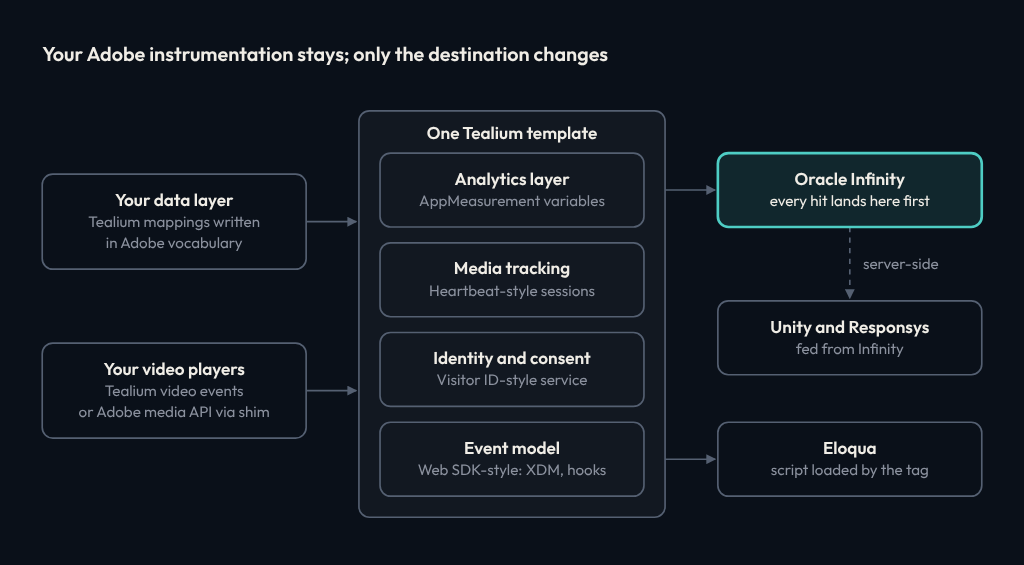
Every hit lands in Oracle Infinity first. In this design, Unity and Responsys get their data server-side from Infinity rather than from the browser, so the tag puts identity keys on every hit once it has them: wt.dcsvid and a hashed email in wt.email_sha256. Eloqua is the one destination here with its own browser script, so the tag loads it, tracks the page view in your opt-in mode, and carries the Eloqua visitor GUID onto later Infinity hits.
What About Web SDK?
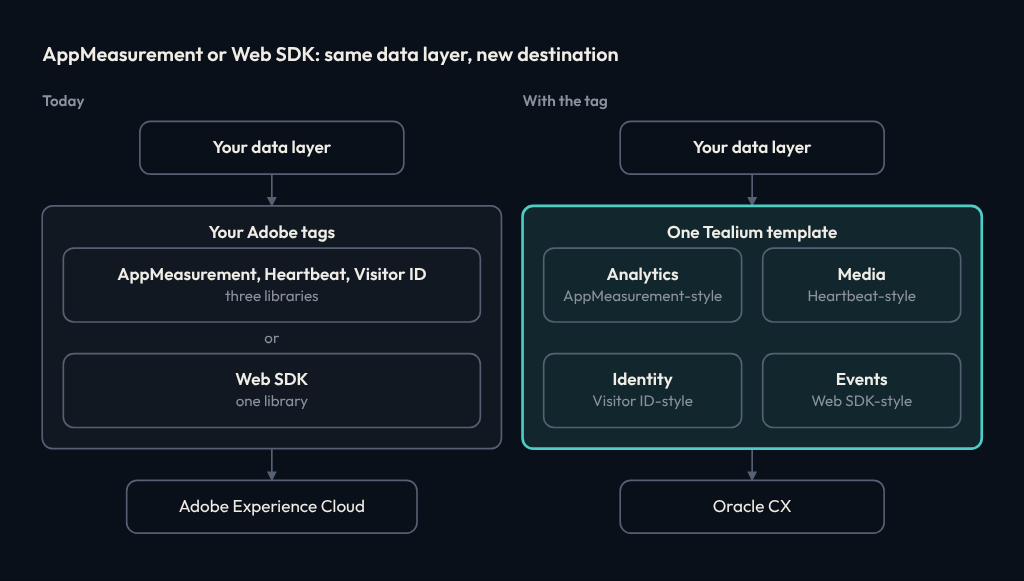
Adobe has its own answer to tag sprawl. Its Web SDK replaces AppMeasurement, the Visitor ID Service and the Target and Audience Manager libraries with one library, which sends a single payload to Adobe’s Edge Network. If the goal is fewer Adobe libraries, Web SDK gets you there.
It consolidates the code, not the dependency. Every event still goes to Adobe’s Edge Network and is routed by Adobe datastreams. Adobe’s event forwarding can pass that data on to other destinations, but it runs on Adobe’s Edge Network, so it stops when Adobe does.
Moving to Web SDK is also a migration of its own: a datastream, usually XDM schemas, and remapped variables. If you’re re-instrumenting anyway, decide first where the data should go. The tag takes either vocabulary: AppMeasurement-style mappings, as described below, or XDM-shaped data and identityMap-style IDs, with the gaps listed under Where It Stands.
How the Mapping Works
The tag reads the same Tealium mappings you would write for Adobe. Map a variable to pageName, eVar12 or contextData.member_tier, or set event5 when a value matches, and the tag knows what to do with it.
| Adobe concept | What the tag does | Where it lands in Infinity |
|---|---|---|
| Page variables: pageName, channel, campaign, purchaseID | Maps them to Infinity's standard parameters | wt.ti, wt.cg_n, wt.mc_id, wt.tx_i |
| eVars, props, lists, hierarchies | Sends them as custom dimensions, with eVar-style persistence for the session or the visitor | wt.z_evar12, wt.z_prop4 |
| Context data | Sends custom parameters with normalized keys | wt.z_c_member_tier |
| Success events, values, serialization | Counts events with their values; a serialized event or a repeat order ID counts once per browser | wt.z_event5, wt.z_events, wt.tx_e |
| Merchandising variables | Sends per-product values aligned with the product list | wt.z_pn_evar3 beside wt.pn_sku |
| Link tracking (s.tl) | Records link type (download, exit or custom), name and URL | wt.z_link_type, wt.z_link_name, wt.z_link_url |
| Heartbeat and Media SDK sessions | Builds media sessions with ads, chapters, quartiles and quality of service | wt.clip_* and wt.z_clip_* (next section) |
| Visitor ID Service, customer IDs | Keeps a first-party visitor ID, namespaced customer IDs and a hashed email | wt.z_vid, wt.dcsvid, wt.email_sha256, wt.z_cid_crm |
| Web SDK: XDM, identityMap, onBeforeEventSend | Flattens XDM into parameters, takes identityMap-style fields, and runs an alloy-style hook that can edit or cancel a hit | wt.xdm_web_webpagedetails_name |
| A4T-style experiment exposure | Stamps experiment, variant and ID, vendor-neutral | wt.z_exp_name, wt.z_exp_variant, wt.z_exp_id |
Serialization here is a client-side stand-in for Adobe’s server-side de-duplication, so it holds per browser, not across devices.
A purchase, end to end. Here is an order confirmation page whose mappings were written for Adobe:
Data layer                                Mapping
page_name      "checkout:confirmation"    pageName
site_section   "checkout"                 channel
member_tier    "gold"                     eVar12
tealium_event  "purchase"                 purchase (event)
order_id "ORD-10042" order ID, via Tealium's E-Commerce extensionReload the confirmation page and the hit still goes, flagged wt.z_dup_order=1 and without wt.z_purchase or wt.tx_e, so it shouldn’t count as a second purchase.
Media: Where Most Migrations Stall
Page analytics is the easy part. Video is where migrations stall, because media measurement is a state machine: sessions, ad pods, chapters, pauses that end sessions, and beacons that count time spent.
The tag meets players where they are:
- Players that already feed the Adobe Heartbeat tag. This tag reads the same Tealium video calls and built-in video variables, such as
video_nameandvideo_current_playhead, so the player doesn’t change. Two setup differences: bare event names such as play and pause need mapping tovideo_playandvideo_pause, which the Heartbeat tag does on its own, and custom media mappings need re-pointing. - Players that call Adobe’s media API directly. A small media shim exposes the method surface of MediaHeartbeat 2.x and Media SDK 3.x for JavaScript. It can replace the Adobe tracker, wrap it so Adobe and Oracle both get every call, or patch Adobe’s globals so existing player code tees without edits. When wrapped, an Adobe failure can’t block Oracle.
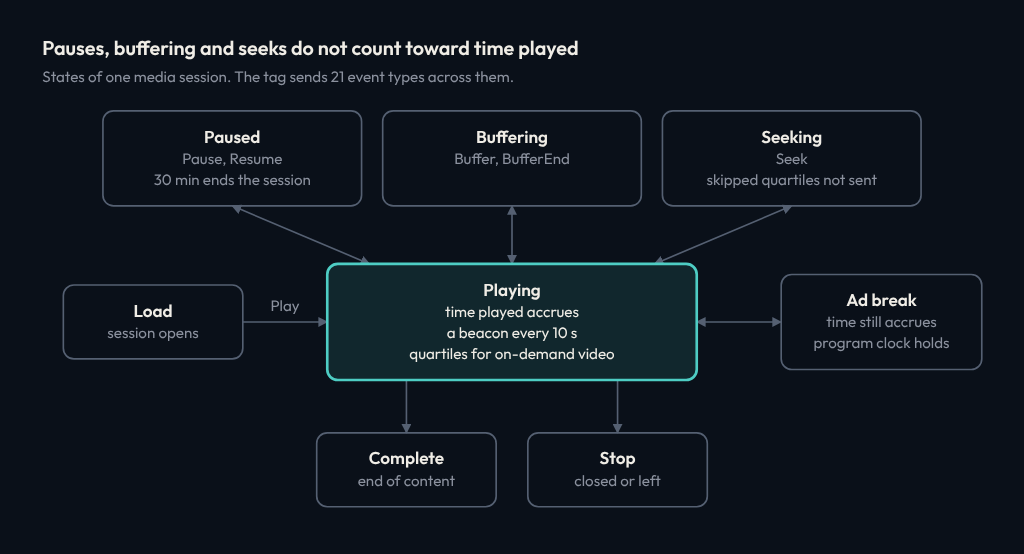
Either way, Infinity receives sessions in its own video vocabulary. That means load, play, pause, resume, seek, buffer and bitrate events; ad break, ad and chapter events; quartiles for on-demand video; a beacon every 10 seconds by default; then complete or stop. A few details matter more than they look:
- Time played is counted, not inferred from the playhead. The tag accrues wall-clock time only while video is playing, ads included, so pauses, buffering and seeks don’t inflate it.
- Skipped quartiles aren’t credited. Seek past the halfway mark, and the 25% and 50% markers are recorded as passed but never sent.
- Ads don’t advance the content playhead. Ad events are labeled as ads, and the program’s position holds while an ad plays, provided the player keeps reporting the program’s position during the break.
- Long pauses end the session, as in Adobe. Thirty minutes by default, configurable.
- Quality of service rides along. Bitrate, frames per second, dropped frames and startup time travel with each event.
Identity and Consent, Built In
Adobe shops lean on the Visitor ID Service more than they realize. It is what makes the analytics tag, the media tracker and the marketing tags agree on who someone is. The tag runs one shared identity and consent service for every tag instance on the page:
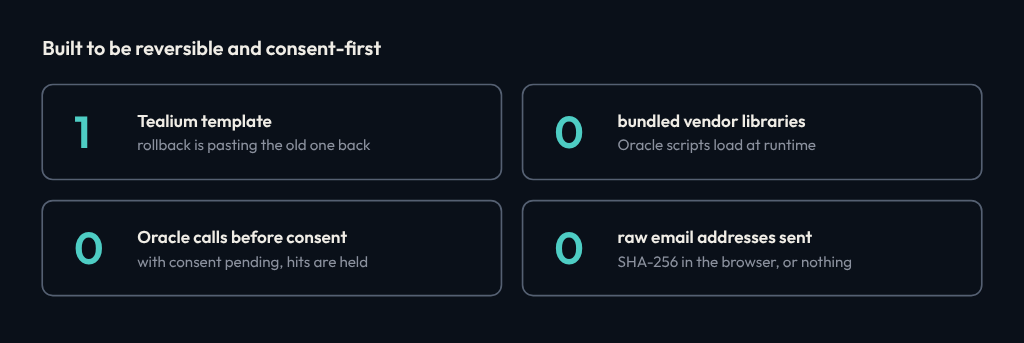
- A first-party visitor ID in a cookie on your own domain. The cookie isn’t written while consent is pending, an opt-out deletes it, and a cross-domain hand-off link is valid for five minutes.
- Customer IDs by namespace, each with authenticated, logged-out or ambiguous state and a primary flag. They can come in the Visitor API’s shape or as Web SDK identityMap-style fields.
- Email hashed in the browser. The address is trimmed, lowercased and hashed with SHA-256 before anything is sent. If the browser can’t hash it, the email isn’t sent at all.
- Identity keys on every hit.
wt.dcsvidcomes from a visitor ID you pass in or your primary customer ID,wt.email_sha256from the hash, and the tag’s own first-party ID travels aswt.z_vid. The tag also picks up the Responsys recipient ID from email click-throughs and carries the Eloqua visitor GUID. - Consent as a gate. Consent is in, out or pending, with a default you choose; for opt-in regimes, start at pending. Pending hits are held, up to 100, then sent on opt-in or dropped on opt-out, which also clears the visitor cookie. Oracle’s collection library doesn’t load until consent is in, and Eloqua’s opt-in follows the same switch.
Run It Alongside Adobe First
Nobody should switch analytics vendors in one release. The tag is built to run beside Adobe until the numbers agree.
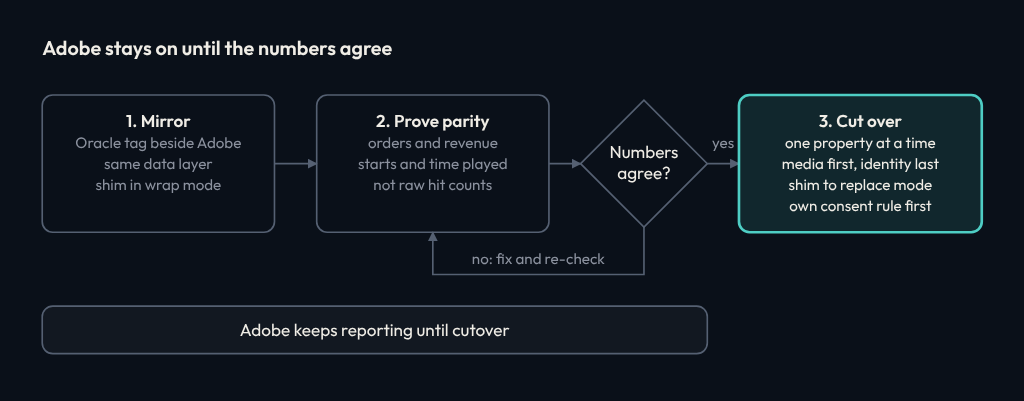
Mirror
Add the tag to your Tealium profile next to the Adobe tags, on the same data layer, with your Adobe mappings copied across. Players that call Adobe’s media API get the shim in wrap mode, so Adobe keeps every call. Keep your other tags’ load rules off the shim’s video events, and your Adobe reports don’t change.
Prove parity on business measures
Compare page views, visits, orders and revenue for the site, and video starts, time played and ad starts per title per day for media. Don’t compare request counts: the two products batch and beacon differently by design, so raw hits won’t match even when the measurement does.
Cut over one property at a time
When a property’s numbers hold within the tolerance you agreed up front, switch off its Adobe tags, media first and identity last, and move players on the shim from wrap mode to replace mode, a small player change. Before you do, give Oracle its own consent rule, so nothing depends on a tag you’re removing.
Most of this is Tealium configuration, so most steps are a publish you can roll back.
Where It Stands
Short version: the code exists, and live validation doesn’t yet.
What exists
the unified tag; the media shim; a proxy that passes app media calls to Adobe unchanged while copying them to Oracle; and a server-side translator that turns Adobe media API payloads into Infinity video events, for apps and connected TV. The translator passes a 14-check test suite on synthetic data and has known gaps to fix; the tag itself has no automated tests yet.
What hasn’t happened
any of it sending data to a live Infinity account. Until it does, a short list stays open: how Infinity treats the tag’s video event codes, the consent gate end to end, fan-out to several accounts, the hash case email matching expects, and where late-arriving events land.
What isn’t built
Nielsen, Activity Map-style automatic click capture, mobile lifecycle metrics, and player-state tracking such as mute and full screen. Two gaps for teams on Web SDK: its Analytics fields, whether in XDM or the data object, aren’t yet treated as eVars, props and events, and its streaming media component isn’t covered.
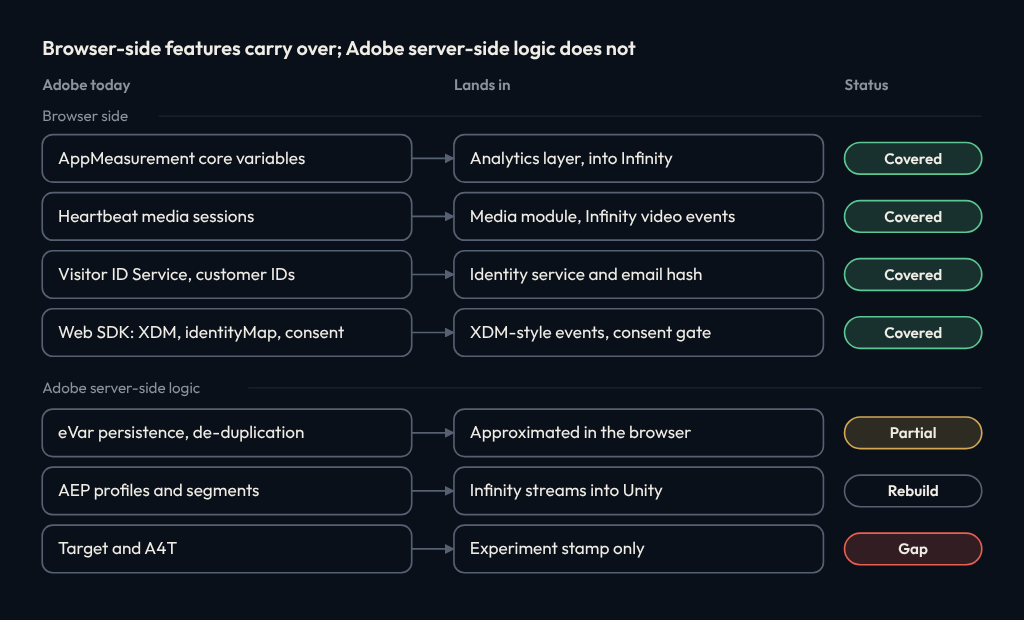
That gap is the reason for the ask at the end of this post.
Swapping the destination isn’t the prize. What you can do once the data lands is.
What Comes After the Tag
On Oracle, the aim is for behavioral data to sit next to what it needs to meet: customer profiles in Unity, orders and subscriptions in the database, and models running on the same infrastructure as the data. I mapped what a full move onto Oracle Cloud Infrastructure involves, workstream by workstream, in the OCI migration roadmap. Its CDP workstream moves collection from Adobe to Oracle; this is the tag for that step, and the safe route is the one above: mirror, prove parity, cut over.
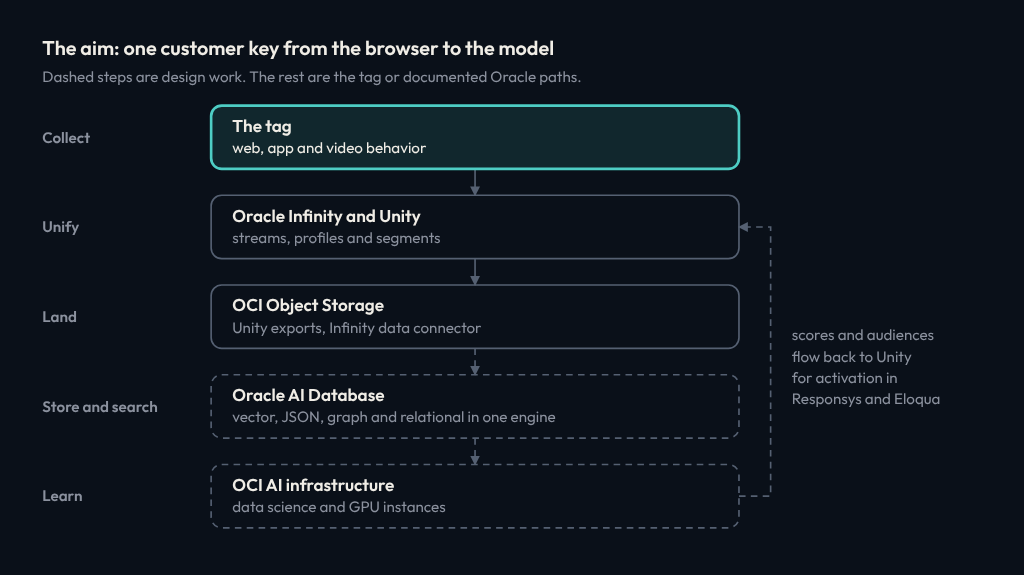
It is also the prerequisite for something bigger. INBI argues that infrastructure will increasingly observe behavior directly, from delivery logs, API calls and server events. The client tag is how you get there.
An inference model needs ground truth to learn from and to be scored against. That ground truth comes from the client: a tag reporting what was actually played, clicked and bought, for sessions the infrastructure also logged. So the tag becomes the calibration instrument.
As server-side and inferred signals prove they match it, the client sends less. In the end it reports only what only the device knows: what was on screen, whether a video was paused or just buffered ahead, what happened offline.
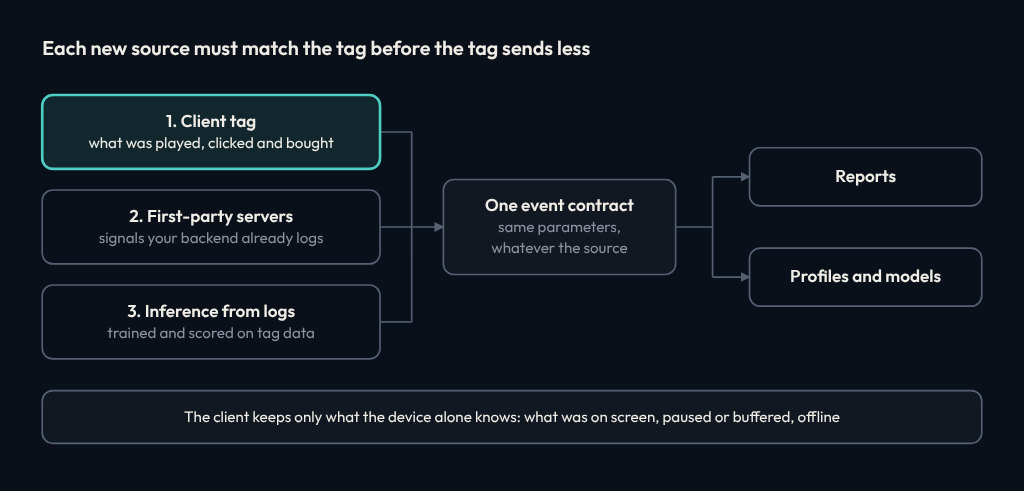
The goal is one event contract through all of it, so reports read the same parameters whether the source is the browser, your servers or a model.
Looking for Design Partners
I’m looking for two or three teams to take this onto a live Oracle Infinity account with me. The best fit:
- You run Oracle Infinity, ideally with more of Oracle CX, behind Tealium iQ.
- Adobe is still in place, or was recently, so there’s a baseline to prove parity against.
- Someone on your side owns the Tealium profile and can give us a development environment.
You get the tag set up on your development profile, a side-by-side parity check against your Adobe numbers, and a say in what goes into v1. The work gets the live validation it needs.
If that’s your stack, get in touch.
Next in the series
The Hardest Part of One Streaming App Is the Data
Five data decisions under a single streaming service.
The series
Oracle CX: The Next Platform War
Where Oracle can take share from Adobe in enterprise CX.
Infrastructure-Native Behavioral Intelligence
Infrastructure as the behavioral record, with the client tag as its calibration.
Full Infrastructure Migration to Oracle Cloud
A 24-month plan for moving a streaming technology estate onto OCI.
Lock-In Lives in Your Tags
One Tealium tag that speaks Adobe and sends it to Oracle CX.
You're reading this
The Hardest Part of One Streaming App Is the Data
Five data decisions under a single streaming service.
Evaluating your CX or CDP stack?
Get vendor-neutral guidance
We advise across 15+ CX and CDP platforms, including Oracle, Adobe and Salesforce, backed by a directory of nearly 7,000 integrations.
Independent · Architecture-led · No platform affiliation
Disclosure: CdpHub is independent and is not affiliated with, endorsed by or sponsored by Adobe, Oracle or Tealium. Product names are trademarks of their owners and appear here only to describe compatibility. The tag is a CdpHub build, not an Adobe, Oracle or Tealium product.